- Home
- Multilogin Getting Started Guide
- Invite friends and earn rewards: earn 15% for each successful referral
Invite friends and earn rewards: Earn 15% for each successful referral
Author Yelena V (Updated on June 10, 2026)
Updated on June 10, 2026
Do you have friends, colleagues, fans, or clients who need to use Multilogin? Share your referral link or invitation code with them, and you will earn a reward when they purchase a plan.
You will receive a 15% commission from their plan payments, including renewals. Your rewards will be added to your referral balance, which can later be used for Multilogin plans, cloud phone minutes, or global IP traffic.
Who can use this feature?
- 👨💻 Account owners
- 💰 Available on all paid plans
Cooperation Process
- Share your referral link or invitation code
- Your friend registers and pays for a plan
- You receive 15% of the final amount after discounts, before tax
- Your reward will appear as frozen in the 'Referral History'
- If there are no refunds or cancellations within 45 days, it will be added to your referral balance
- You can use it at checkout
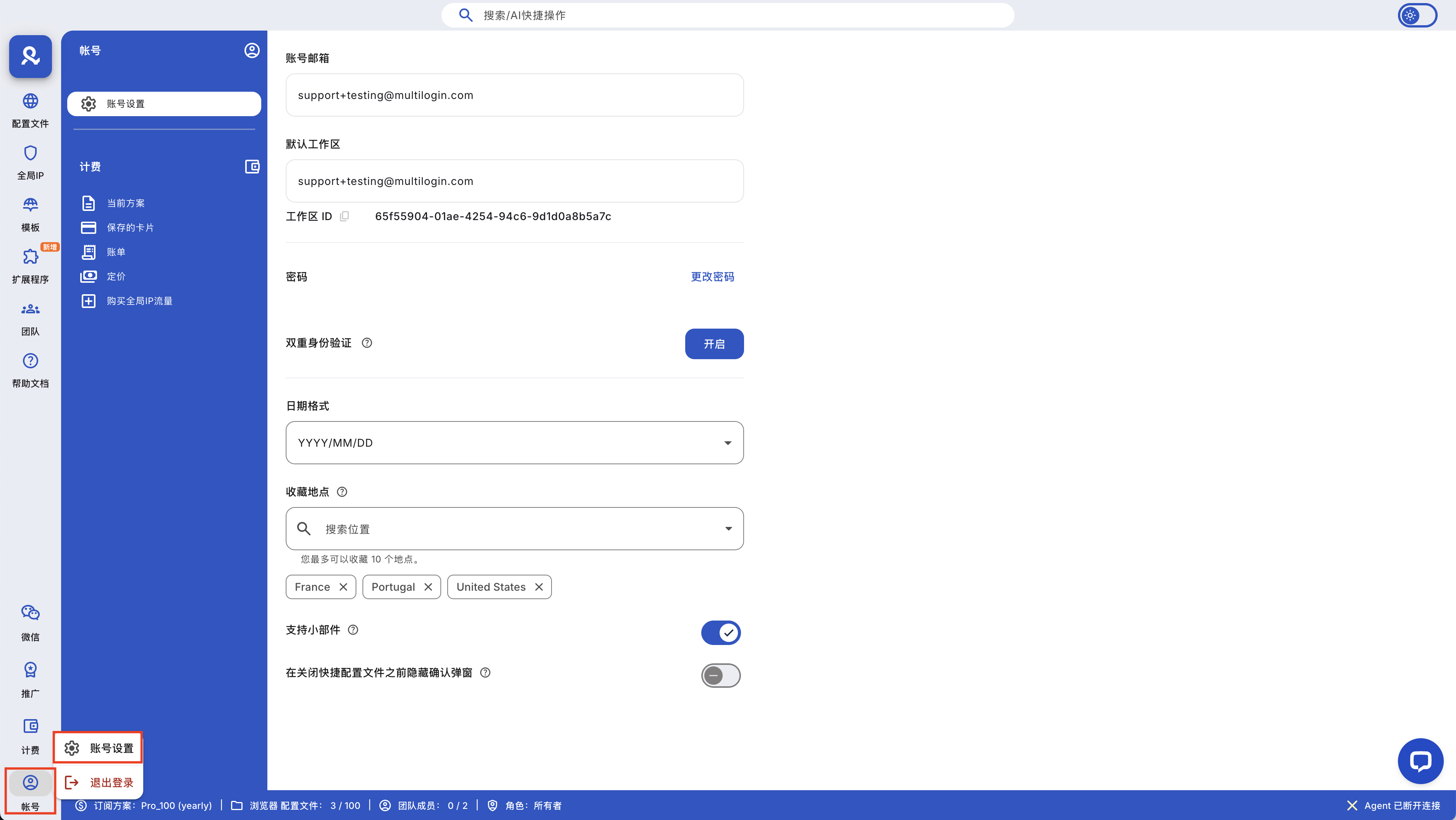
How to Share a Promotion Link or Invitation Code (Inviter)
- Click 'Promotion' in the top menu
- Go to 'Promotion Links and Invitation Codes'
- Click 'Copy' next to the promotion link or invitation code
- Send it to your friends
How to Apply for Promotion (Invitee)
Your friend only needs to use your referral once. After the first successful payment, the referral relationship will remain linked to their account, so you can continue to earn from their renewals. Share the following steps with them so they can get started.
Option 1: Use a promotional link
- Open your referral link
- Choose a paid plan
- Go to the checkout page
- Check if the invitation code has been entered
- Complete the payment
Option 2: Use an Invitation Code
- Choose a paid plan
- Go to the checkout page
- Paste your invitation code into the invitation code field
- Click 'Apply'
- Complete the payment
Promotion Restrictions
You will not receive promotion rewards in the following situations:
- Free plan registration
- Payment failure
- Purchase of cloud phone minutes
- Purchase of global IP traffic
Some important notes:
- Promotion balance cannot be withdrawn
- Promotion balance cannot be transferred to other accounts
- Refunds, chargebacks, or cancellations will cancel the reward
- For annual plans, rewards are issued monthly, not added all at once
Explanation of Promotion Status
- Frozen: The reward is still within the 45-day waiting period — you cannot use it yet.
- Available: The waiting period is over, and the reward can be used.
- Cancelled: The reward has been removed because the payment was refunded or cancelled.
- Used: You have already spent this balance at checkout.
How to Use Your Promotional Balance
- Go to the checkout page
- Find your available promotional balance
- Enter the amount you want to use
- Click 'Confirm'
- Check the remaining amount to be paid
- Complete the payment
You can use all or part of your balance to purchase and renew packages, as well as recharge cloud phone minutes and global IP traffic.
Frequently Asked Questions
Can I withdraw the promotion balance as cash?
No. You can only use the promotional balance within Multilogin.
Can I use the promotion balance for cloud phone minutes or global IP traffic?
Sure. You can use the promotion balance for mobile minutes and global IP traffic.
Will purchasing cloud phone minutes or global IP traffic earn promotional rewards?
No. You only earn rewards from payments and renewals of eligible plans.
Do I profit from renewals?
Yes. You earn revenue from each successful renewal subscribed by your friends.
Does my friend need to enter my invitation code again when renewing?
No need. Once the invitation code is applied at checkout, the referral relationship will remain connected to their account.
What happens if the subscription is canceled?
- If you cancel your own subscription, the available referral balance will remain in your account
- If an invited user cancels their subscription, the frozen reward generated from that payment will be canceled
- If the invited user subsequently renews, the new eligible payment will generate a new frozen reward; if there are no refunds, chargebacks, or cancellations, the reward will be available after 45 days
In this article
- Cooperation process
- How to share promotion links or invitation codes (for the inviter)
- How to apply for promotion (for the invitee)
- Promotion restrictions
- Explanation of promotion status
- How to use your promotion balance
- Frequently Asked Questions
- Can I withdraw my promotion balance as cash?
- Can I use my promotion balance for cloud phone minutes or global IP traffic?
- Will buying cloud phone minutes or global IP traffic earn promotion rewards?
- Do I benefit from renewals?
- Does my friend need to enter my invitation code again when renewing?
- What happens if the subscription is canceled?
Multilogin Community
Stay informed, share your thoughts, and interact with others!
Read more related content
Related Articles
- Multilogin Support and Resources: How to Get Help Quickly
- Frequently Asked Questions about Using Multilogin
- How to Use Cloud and Local Profile Storage in Multilogin