- Home
- Global IP & Masked IP Address
- IP Masking Function
- How to Use Global IP Traffic Saver in Multilogin
How to Use the Global IP Traffic Saver in Multilogin
Author Yelena V (Updated on May 21, 2026)
Updated on May 21, 2026
What is a global IP traffic saver?
Want faster browsing speed and less data usage? Get to know the Global IP Traffic Saver—your new friend. Here is everything you need to know and how to use it.
The Global IP Traffic Saver can block images and videos, thereby reducing data usage and speeding up browsing. If you want to speed up page loading or save global IP traffic, this tool is your best choice!
Enabling the traffic saving feature will block images and videos to save data. But please note, some websites may detect this as unusual behavior, causing them to not function properly. If a website crashes or fails to load, try turning off the traffic saving feature for a smoother experience.
Why use a global IP traffic saver?
- Save global IP data: No need to waste bandwidth on large media files
- Faster loading speed: Especially convenient if you manage a large number of profiles or use limited global IPs
- Stay efficient: Focus on important content without distractions
If you are scraping, testing, or just setting up profiles, enabling the traffic saver can significantly speed things up.
How does the global IP traffic saver work?
- Mimic: Blocks images and most autoplay videos (some videos may still play due to technical reasons)
- Stealthfox: Blocks all images and videos
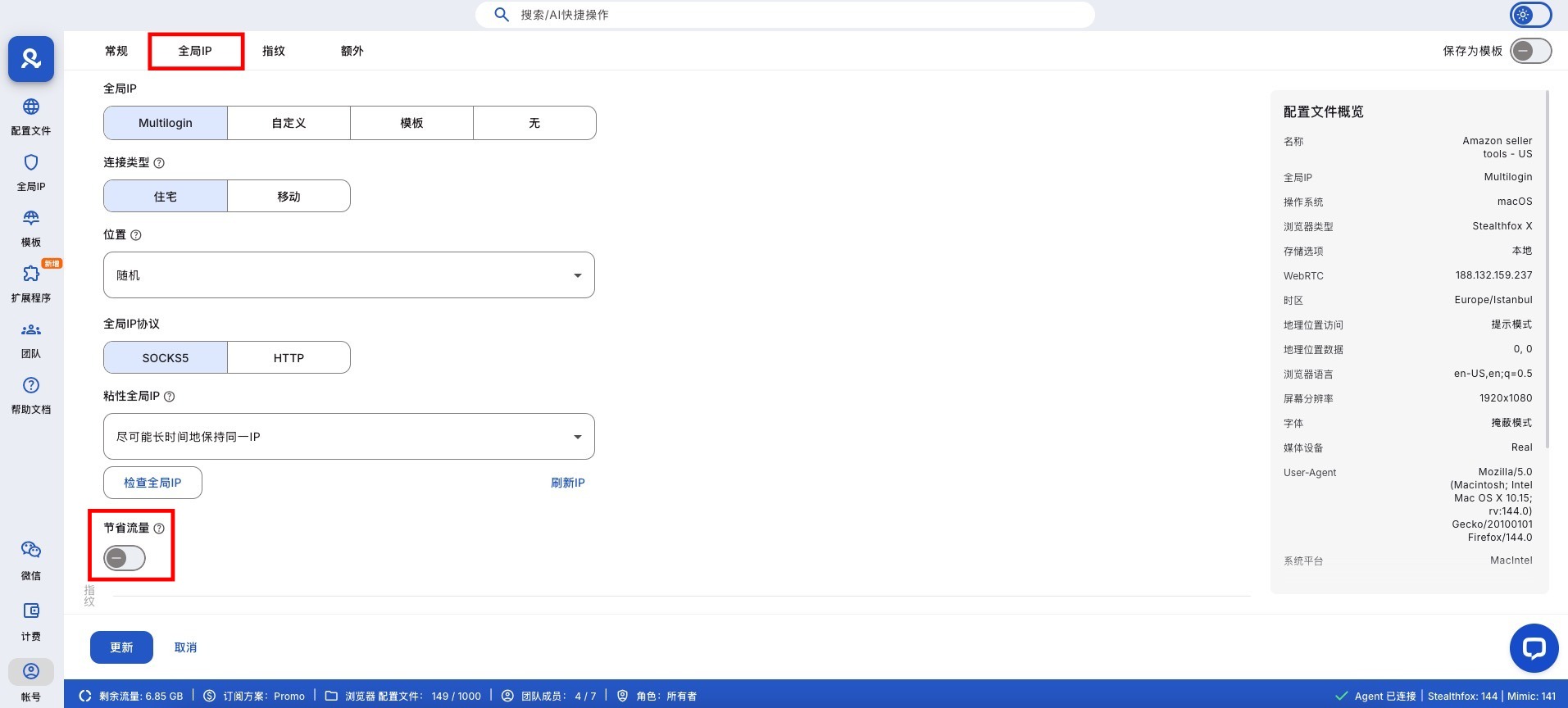
How to Enable the Global IP Traffic Saver
- Go to the 'Global IP' section in profile settings
- Turn on the 'Save Data' switch
Professional Tips
- Use a global IP traffic saver when fetching or setting up accounts – no need to load media you won't use
- Combine with the 'start URL' setting to load key pages, avoiding wasting traffic on homepage clutter
- Great for slow connections or when using mobile global IPs or hotspots
- Using our API? Just add the save_traffic parameter! When calling the following API endpoints, set save_traffic: true (or set to false to turn it off): Profile Create, Profile Update, Profile Partial Update, Start Quick Profile
save_traffic
save_traffic: true
false
Frequently Asked Questions
Can I turn off the data saver at any time?
Yes! Just go back to the profile settings, turn off the switch, and you can return to full media mode.
Will a data saver affect the verification code?
Yes. To resolve this issue, you need to disable the data saver.
Will the data saver break the way websites load?
Not at all! The core content still loads normally — it's just that things like images and videos are skipped.
Will this affect the login form or button?
No. The necessary interactive elements can still function perfectly.
In this article
- What is a global IP data saver?
- Why use a global IP data saver?
- How does a global IP data saver work?
- How to enable a global IP data saver
- Professional tips
- Frequently asked questions
- Can I turn off the data saver at any time?
- Will the data saver affect verification codes?
- Will the data saver disrupt how websites load?
- Will this affect login forms or buttons?
Multilogin Community
Stay informed, share your thoughts, and interact with others!
Read more related content
Related Articles
- How to bookmark locations in Multilogin
- How to use the global IP template manager in Multilogin
- How to refresh the global IP in Multilogin
- How to easily control the global IP through the right-click menu